How it works Route builder
The route builder
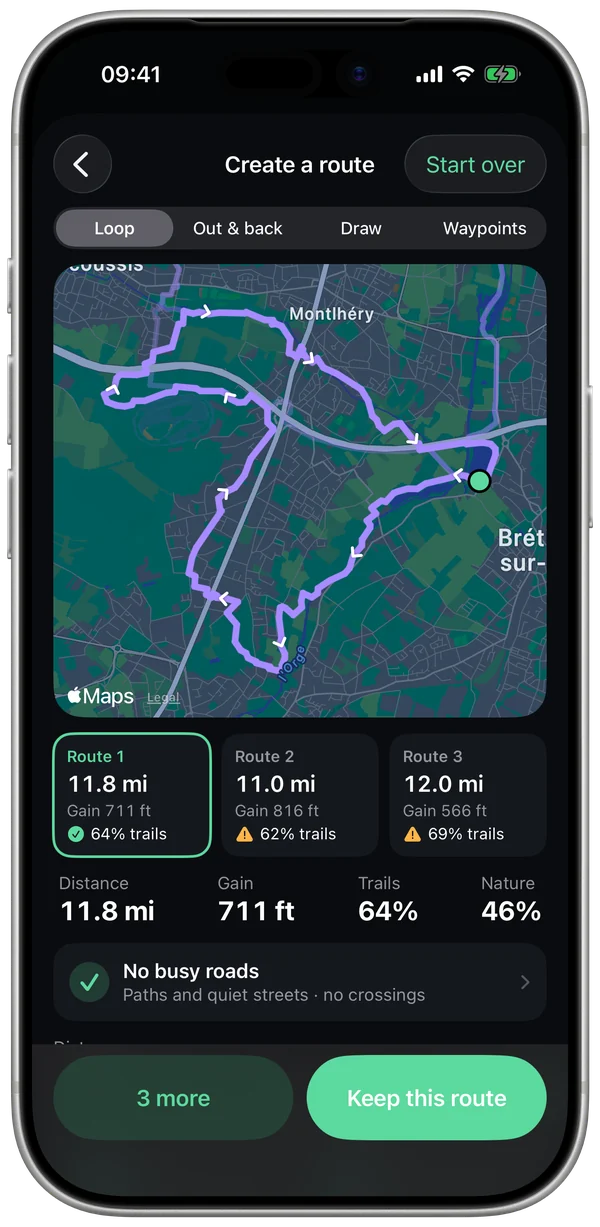
Pick a distance and Stamio draws three loops from wherever you are, away from busy roads, with the elevation you want. It isn't a car or bike router repurposed: the engine was written for running, and it runs entirely on your iPhone.
What Stamio uses
- The OpenStreetMap data Stamio already hosts for your watch: every street, path, bike trail and hiking trail, with its type, plus the water, parks and woods around it.
- Worldwide elevation data, accurate to about 40 ft.
- Your usual start and the elevation of your recent runs, read from Health on your iPhone, to set the default terrain.
- Your plan's workout, when you build the loop from it: its distance and its type.
How it's calculated
- 1
A network rebuilt for running
Stamio stitches the map's paths into a network for runners: loose ends joined, intersections restored, and never a bridge mistaken for a crossing. Highways, expressways, bus lanes and private roads aren't part of it.
- 2
Every path has a price
A busy road costs far more than a path, a bike trail or a quiet street; the waterfront, a park or the woods cost less. Crossing a busy road counts too, even at an intersection, and turning back has a price.
- 3
Dozens of tries, three picks
For a loop, Stamio tries dozens of shapes around your start, in parallel across your iPhone's cores, fits each one to the right distance and keeps the best three, each heading a different way.
- 4
No hooks
Nobody runs "up 200 yards, then back down the next street over." Those hooks are spotted and removed, and a loop that still has one only shows up as a last resort.
- 5
Elevation, path by path
Elevation is sampled every 50 ft along every path, so the engine knows what climbs and in which direction. "Flattest" charges for every percent of grade; "Custom…" aims for a max elevation gain you set, and tells you straight up when the terrain won't allow it.
- 6
Built for your workout
Intervals or a tempo run: as flat and straight as possible, with as few crossings as possible, so nothing cuts a rep short. Hill repeats: a loop that climbs. A long run: the nicest one, with the elevation of your usual runs.
- 7
Wherever you want to go
Pick a direction or drop a flag on the map: the three suggestions become three different ways to get there.
What you see before you go
- Distance, elevation gain and profile, calculated exactly the way your watch does.
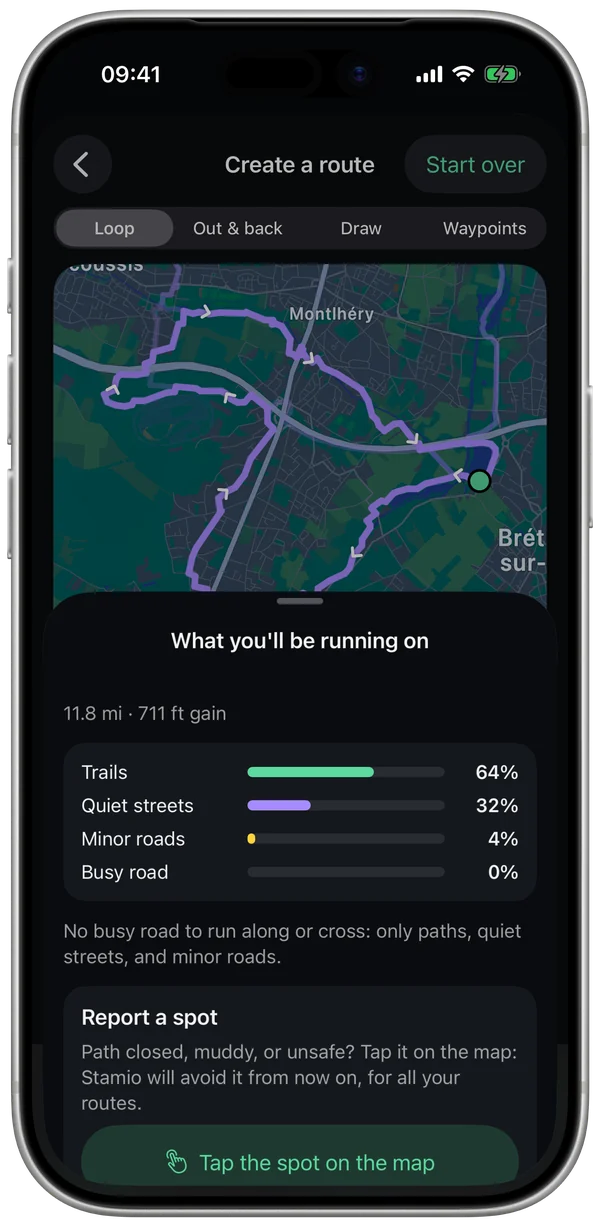
- How much is trail, quiet street, minor road and busy road, and how much runs along the water.
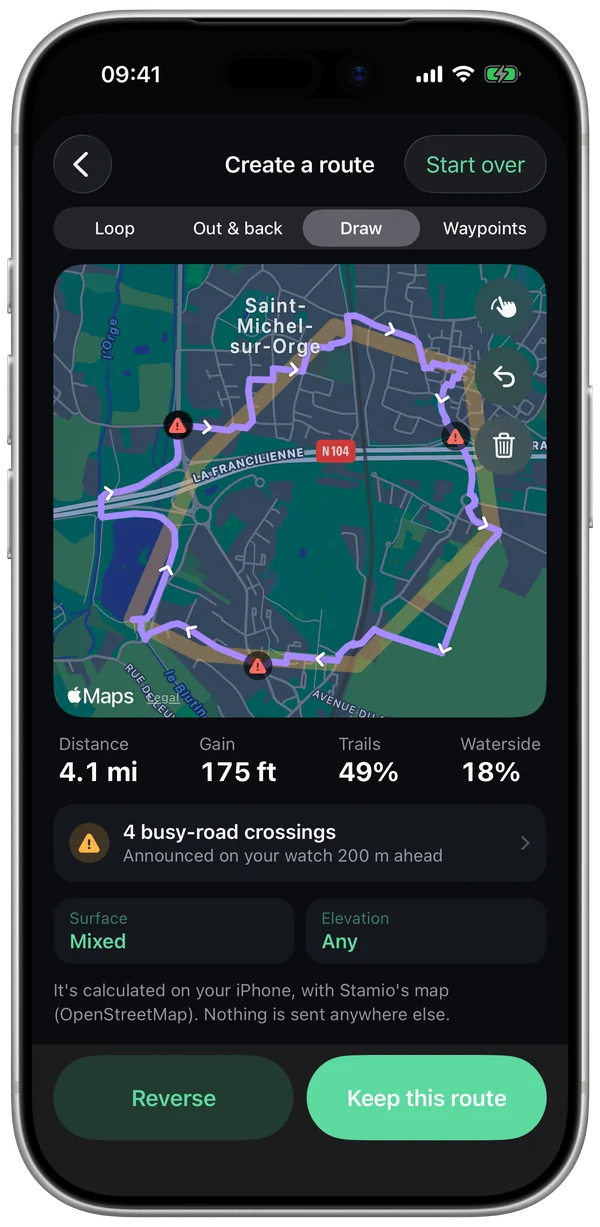
- Any stretch along a busy road and every crossing, in red on the map; your watch calls each one out about 650 ft ahead.
What can throw it off
- The map doesn't know everything: lighting, sidewalks (unless they're mapped separately), or the real condition of a trail or farm track. Check the summary, and report any spot to skip: Stamio won't send you there again.
- Stamio doesn't know where other people run: it goes by the type of each path, not by popularity.
- Elevation gain comes from elevation data accurate to about 40 ft, so it can differ from a watch with a barometer, which reacts to wind and weather.
What you can set
- Distance, surface (Mixed, Mostly trails, Mostly pavement) and elevation (Any, Mostly flat, Flattest, Hilly, Custom…).
- Your start (usual start, a place you search for or a spot you tap on the map) and the direction.
- Loop, out-and-back, sketch or waypoints.
- The spots you've reported, kept on your iPhone.
How it was checked
Elevation was checked on my own runs against a major sports platform's numbers: 85 ft vs. 79 ft over a flat 9-mile run, 52 ft vs. 57 ft and 89 ft vs. 90 ft on vacation runs, 240 ft vs. 282 ft over a hilly 13 miles. Across 24 test loops from 3 to 13 miles: no hooks, distance within 8%.
Measured on my runs so far: the beta extends it to other runners.
Questions
Do I need a connection?
To build a route, yes: your iPhone reads the map and elevation tiles for the area. The math happens on your iPhone, and once you save the route, it goes to your watch and works with no connection.
Is my start sent anywhere?
No. Only the map and elevation tiles for the area are requested, just like a downloaded map: no online routing service ever sees where you start.
Why not use a popularity heatmap?
Other apps don't open theirs. Stamio goes by the type of every path and the spots you report.
Further reading
- Maps: © OpenStreetMap contributors, data available under the ODbL (openstreetmap.org/copyright).
- Elevation: © Mapterhorn, Copernicus, IGN.
The route builder steers clear of what the map knows about. Stay alert to traffic, terrain and light.